Skip to content

Apply to more jobs,
type a lot less

JoboCop fills application forms on Greenhouse, Lever, Workday and 15 more sites from your saved profile. It keeps every answer you give for the next form and tracks where you applied, all inside your browser.

Add to Chrome, it's free

No account needed. Works in Chrome, Edge, Brave and other Chromium browsers.

  • 18 application systems
  • Your data stays in your browser
  • Never submits for you
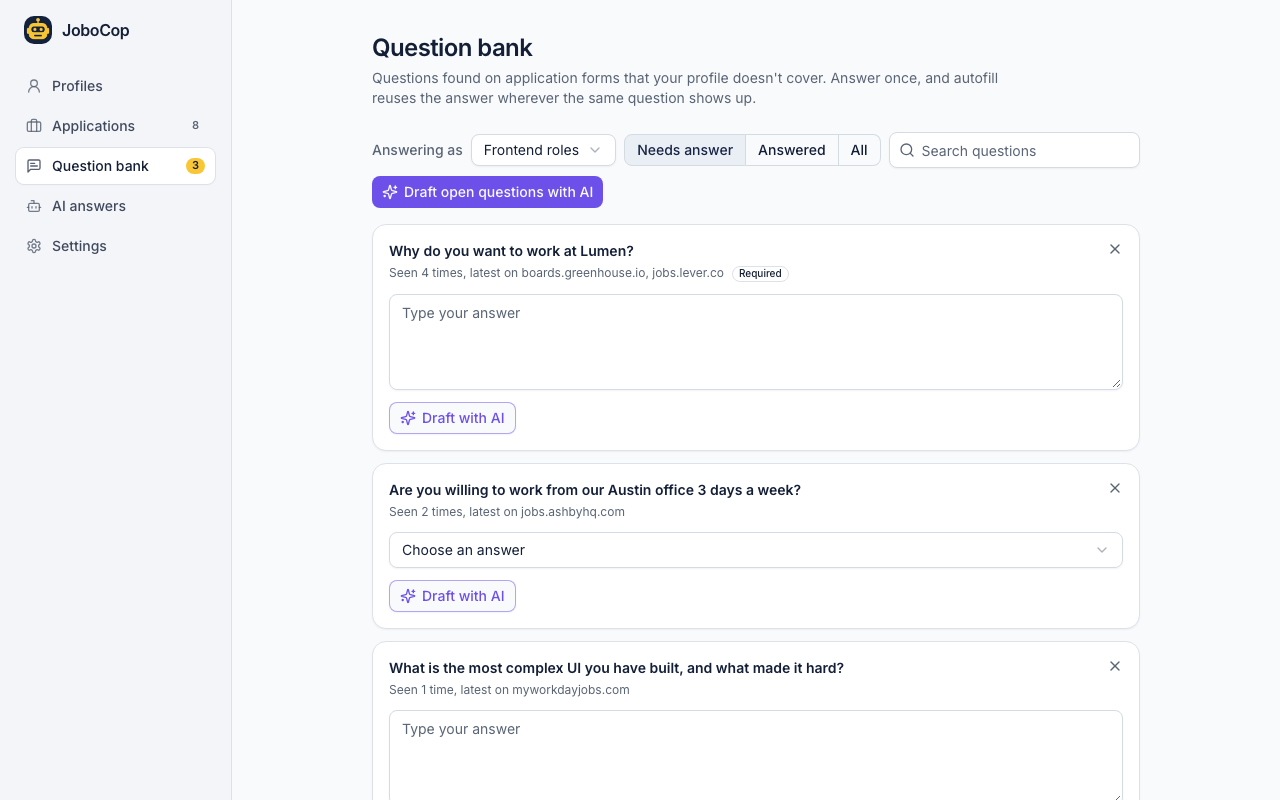
A Greenhouse application filled by JoboCop. Filled fields are outlined in yellow, an AI draft for “Why do you want to work at Lumen?” in purple, and an unanswered start date in red. The side panel says 16 of 18 fields were filled.

Fills forms on these application systems, and on the career pages that embed them

Every application asks the same questions in a slightly different form

Name, links, work history, sponsorship, salary, start date. You type them again for every company, then lose track of where you sent them.

Applying by hand

  • Typing your name, links and work history into every form
  • Digging up what you wrote last week about sponsorship
  • A spreadsheet of applications you forget to update
  • No idea which ones are due a follow up

With JoboCop

  • One click fills what your profile covers, outlined for you to check
  • Answers you saved come back on any company's form
  • Every application tracked, marked Applied when the site confirms
  • A reminder after 14 days, with a follow up email ready to copy

Features

Know where every application stands

Each form you fill becomes a card on your board, with what you sent. It moves to Applied when the site confirms your submission.

  • Weekly summary. Sent, replies and reply rate per profile, every Monday.
  • Interviews. Who you met, what they asked, kept with the application.
  • Export. Everything as a CSV whenever you want it.
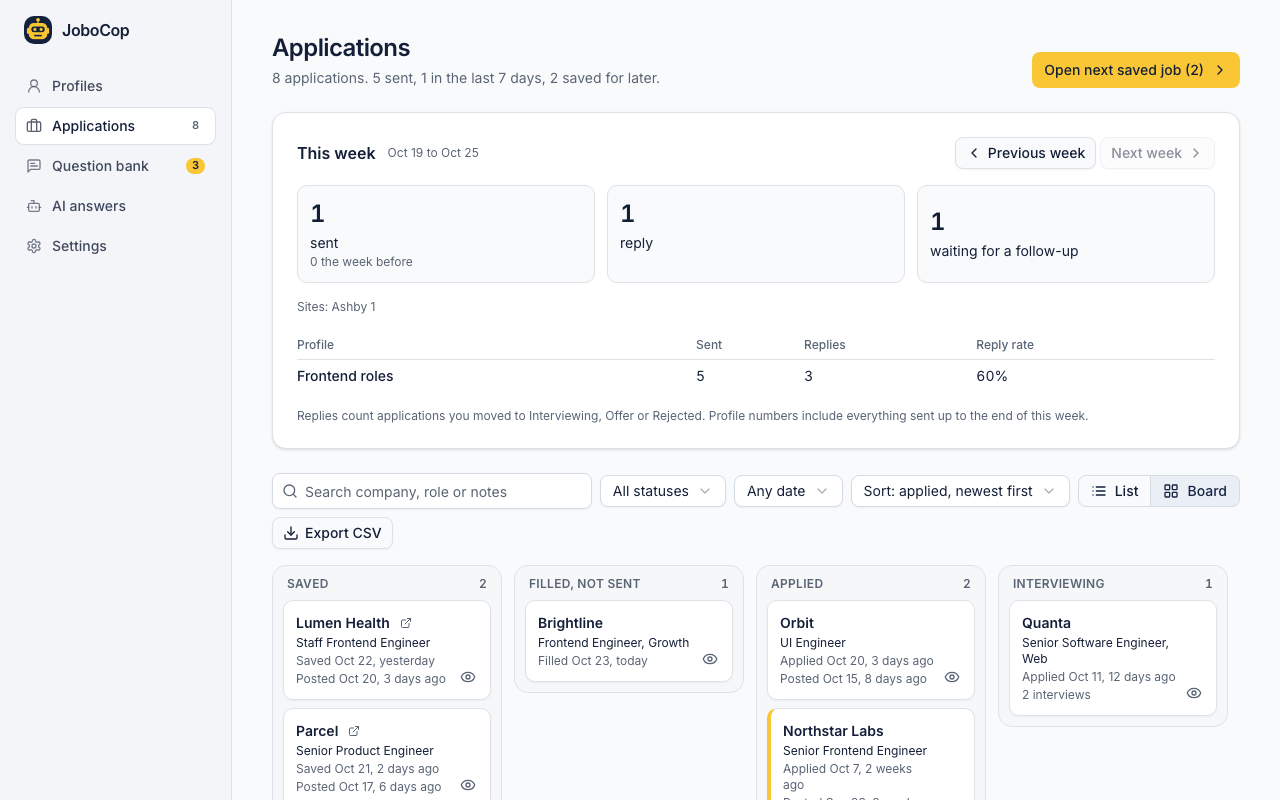
The applications board with columns for Saved, Filled not sent, Applied and Interviewing, under a weekly summary showing a 60% reply rate.

Questions it can't answer yet go to your question bank

“Are you willing to work from our Austin office 3 days a week?” Answer it once in the bank, and JoboCop fills it wherever the same question shows up, at any company.

  • Learns from you. Typed an answer on the page? Save answers I typed keeps it.
  • Knows the options. Dropdown questions come with the choices the site offered.
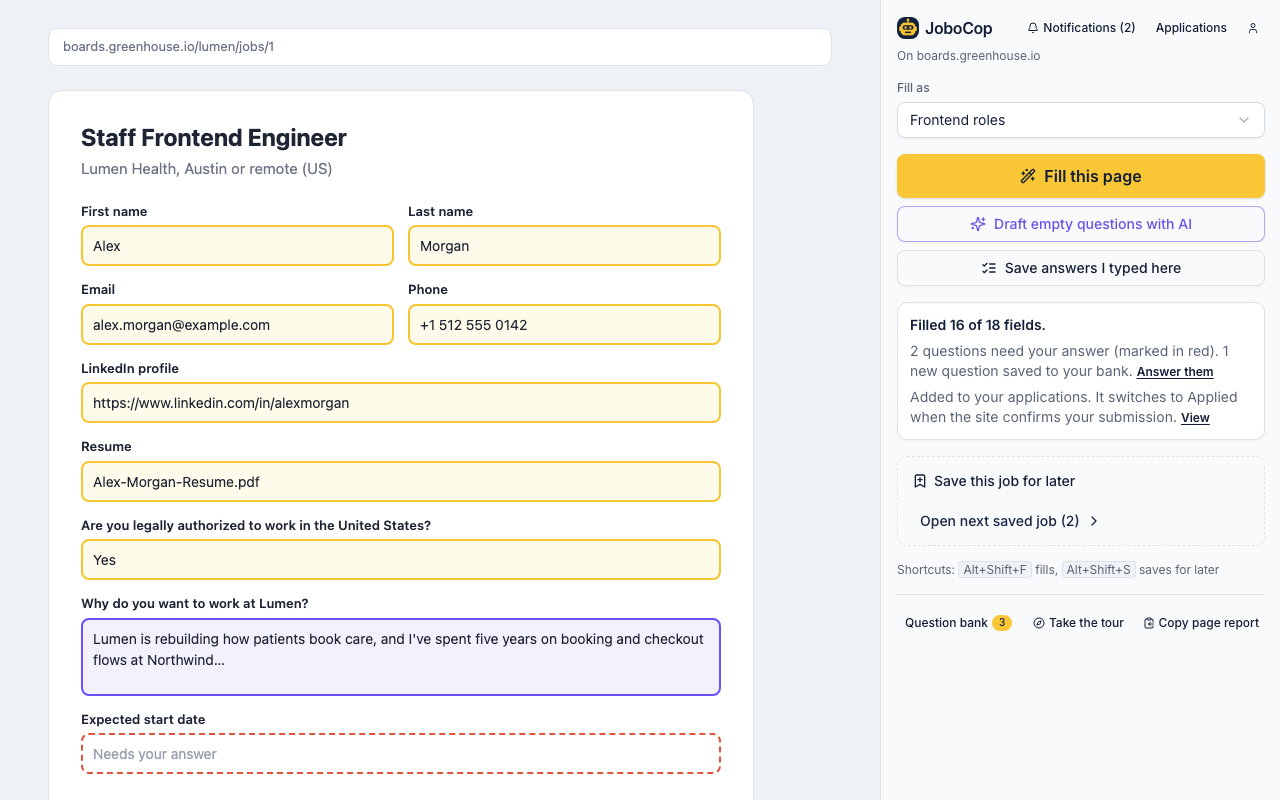
The question bank listing questions found on Greenhouse, Lever, Ashby and Workday forms, each with an answer box and a Draft with AI button.

Draft “Why us?” answers with the AI you already use

JoboCop reads the job posting and your profile, then drafts the open questions. Drafts go into empty fields only, outlined in purple, and nothing is saved until you save it.

  • Your choice of model. Claude Code on your computer, or your own Anthropic, OpenAI, Gemini or DeepSeek key.
  • No made up facts. The model is told to leave an answer empty rather than invent experience.
  • Off until you turn it on. Autofill works without any AI at all.
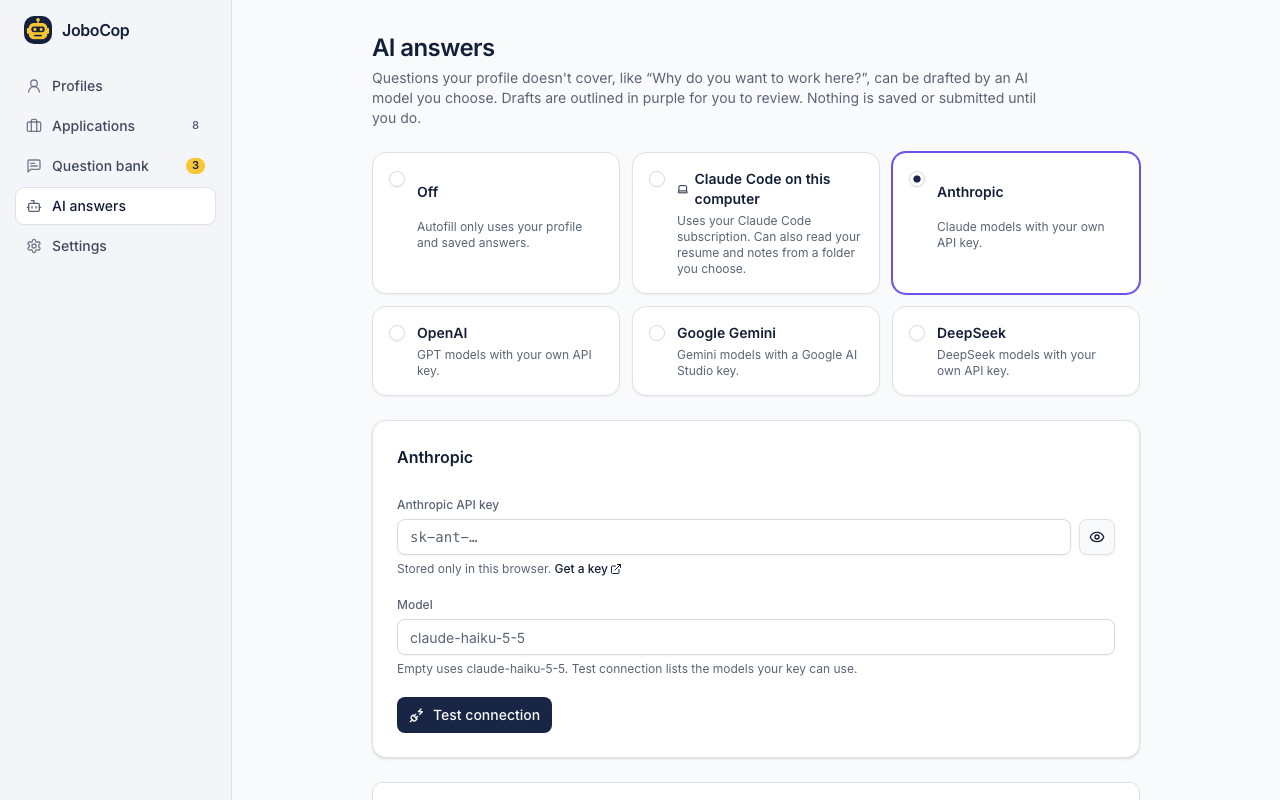
AI answers settings with Off, Claude Code on this computer, Anthropic, OpenAI, Google Gemini and DeepSeek to choose from.

Save jobs for later

Right click a job link on LinkedIn, Indeed or a company site and save it. Open next saved job takes you through them, oldest first.

Follow up on time

A reminder when an application has been quiet for 14 days, or the gap you choose, with an email template that fills in the company and role.

A profile per kind of role

Keep a different resume and answers for frontend and product roles, and pick one before you fill.

Spend your energy on getting the job, not on filling in the same form again.

How it works

Set it up once, in about the time it takes to fill one application.

  1. 01

    Fill in your profile once

    Name, contact, links, work history, eligibility answers and your resume file. Add more profiles if you apply to different kinds of roles.

  2. 02

    Open an application and fill it

    Click Fill this page in the side panel, the Autofill button on the page, or press Alt+Shift+F. Questions it can't answer are marked in red.

  3. 03

    Check it and submit yourself

    Every filled field is outlined. Change what you like, then press the site's own submit button. The application lands on your board.

Your job search stays on your computer

JoboCop has no accounts, no ads and no analytics. Here is exactly what it does with your details.

Stored in your browser
Profiles, answers, your resume and your applications live in the extension's storage, not on our servers. Export them any time.
You press submit
JoboCop fills and outlines fields. It never clicks a submit button for you.
Private details never reach an AI
Your email, phone, street address and EEO answers are left out of every AI request.
Nothing shared without asking
AI requests go straight to the provider you pick. Anonymous job site addresses are only sent if you agree.

Read the privacy policy

Questions

Is JoboCop free?

Yes. Autofill, the question bank, the job tracker and reminders are free and need no account. AI drafts are optional and use your own provider: Claude Code on your computer, or your own Anthropic, OpenAI, Gemini or DeepSeek API key, which that provider bills you for.

Which job sites does it work on?

The 18 application systems listed above, including their forms embedded on company career pages. On other sites it tries its best and tells you it may not work as expected. If a form doesn't fill right, send us a page report.

Does it submit applications for me?

No. JoboCop fills fields and outlines each one so you can check it. You always press the site's submit button yourself.

Where is my data stored?

In your browser. Profiles, answers, your resume and your applications are kept in the extension's storage on your computer, not on our servers. You can export and import them in Settings, and removing the extension deletes them.

What is sent to an AI provider?

Only when you ask for drafts: the questions, the job posting text and the profile details that help answer them, sent straight from your browser to the provider you picked. Your email, phone number, street address and EEO answers are never sent.

Does anything else leave my browser?

If you agree when the extension asks, it sends the cleaned address of job pages you fill, save or apply to, with the day and the name of the application system, so we know which sites to support next. Nothing that identifies you is included, and you can say no or turn it off at any time.

How does it know I applied?

It marks an application Applied when it sees the site's confirmation after you submit. A submit click without a confirmation is recorded, but not counted as applied.

Can I keep different profiles for different roles?

Yes. Make a profile per kind of role, each with its own resume and answers, and pick one in the side panel before you fill. The weekly summary shows the reply rate for each profile.

Does it work on forms with several steps, like Workday?

Yes. The Autofill button stays on the page as you move from one step to the next, so you can fill each step as it appears.

Something else? Read the support page or write to [email protected].

Fill your next application
in one click

Free, no account, and your data stays in your browser.

Add to Chrome, it's free